

production report is called a DPR.

Related post: Tips for Making a Daily Production Report Quickly
Daily Production Report by Department
- Daily production report for the stitching section,
- Daily production report for the cutting section
- Daily production report for the finishing section
- Daily production report from cutting loading to order shipment
Screenshots of the daily production report templates
Each production department is responsible for making its production report. When it comes to making department-wise production reports, they only cover their department data. The following three production report templates are specific to the department.
1. Daily production report for the cutting section
The cutting department’s DPR includes the following information by order, style, and color.
Order Quantity
Production average (fabric consumption)
- Total fabric required – Total meters (or Kgs) of fabric required for the order as per production average.
- Fabric received from store – Total fabric received from the fabric store
- Fabric balance to receive – Fabric yet to receive from the fabric store
Cutting production details
- Today cut quantity (this column shows the last production day’s data) – Number of pieces (of garments) was cut on the last production day. Cut quantity is recorded by style and color. Separate rows are used for entering color-wise cut quantity. Some cutting managers used to make reports size-wise details. This record is collected from the cutting room register or lay report.
- To date cutting quantity – Combined cutting production quantities included all the previous days cutting quantity.
- Balance pieces to cut against the order quantity (planned cut quantity including the extra cutting) – This column shows the record of the total number of pieces yet to cut to complete cutting for an order (color-wise). This is calculated as Planned cut quantity – Till date cut quantity.
Cutting issue details
- Today issues quantity – Number of cuttings sent to the stitching department on the last production date.
- To date issue qty – Total cutting quantity issues to the stitching section for all ongoing orders.
- Balance to issue against order quantity – Cut quantity is yet to issue to the stitching department. This can be presented in one of two ways. (i) Balance quantity against the planned cut quantity or (ii) Balance quantity against total cut quantities.
When one prepares the cutting report color-wise having multiple colors, a summary of production details is calculated by style.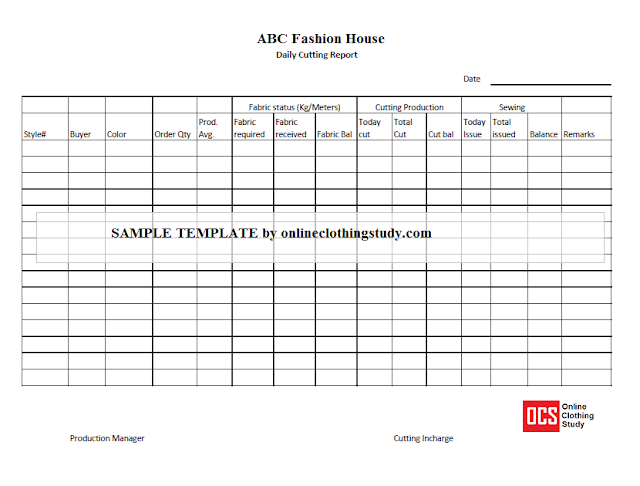
2. Daily production report for the stitching section
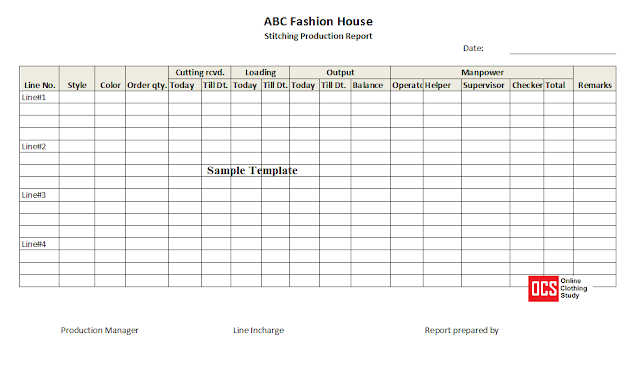
The stitching department’s DPR includes the following information by order, line, and style.
Order quantity – Order quantity by style
Cuttings receiving details / Cuttings loading details
- Today cutting received – (this column shows the last production day’s data)
- Total cutting received – Total cutting received to date from the start of cutting issued.
- Balance pieces – Number of cuttings yet to receive from the cutting department.
Stitching production details
- Today’s production quantity – Number of garments stitched and out from the stitching line on the last production date. Production data is recorded by line and style-wise.
- Till date production – Total production quantity of the running styles till the last production date.
- Balance quantity – Balance stitching quantity can be presented in one of two ways. (i) Balance quantity against the planned order quantity including extra cutting or (ii) Balance quantity against total cutting received from the cutting department.
Manpower details
3. Daily production report for the finishing section
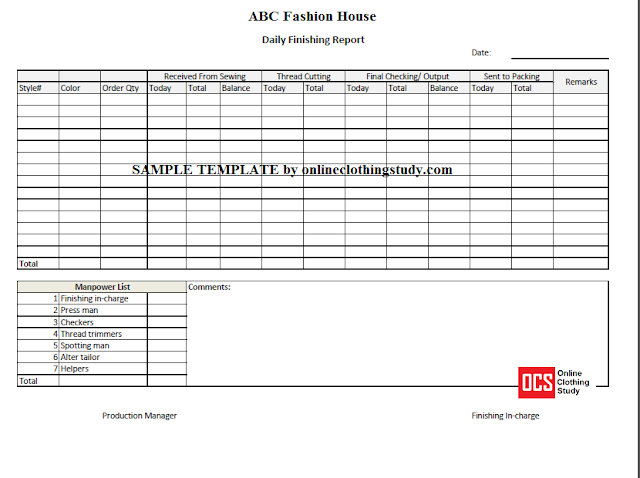
You can customize your production report depending on the processes you want to track. Capture the work loading quantity, processed quantity (production), and WIP level at the end of the day. You can also add manpower details (involved in the production in that section) in the same report as shown in the finishing report.
Advanced notes of the daily production report
The daily production report format can be extended further if someone wants to view other details on the same report. I have made the DPR report for many garment factories during MIS report preparation from the real-time production system. On the DPR, a production manager likes to see line-wise manpower involvement, total SAH produced based on style SAH and line output, line efficiency, overtime production quantity, and regular hours production quantity in separate columns. Some factories also display the number of days production is running for each style.
Another plant is used to see the fabric details of each order and the quality performance of each style on the same DPR report.





Leave a Reply