

Objectives of developing and maintaining operator skill matrix
 |
Before you start developing a database for operators’ skill matrices, you should be clear about the objective of developing a skill matrix database. If you ask me what would be the object of developing a skill matrix, I will tell you primary objectives are
- To check operators skills in running different machines (efficiency percentage)
- To check operators capability of doing various operations (If you maintain operations wise records, you may skip recording machine records or keep both) and their performance level (efficiency %)
- To know the list of operators who can do selected operations and their performance level
Method of developing Skill Matrix
Read this to learn step by step how to develop a template for a skill matrix.
Step#1: Develop an excel template for data recording:
We will be using excel sheet for developing the skill matrix. (Reason, most of the garment factories don’t have software for keeping skill matrix records.)
To have all basic information in one table, you need to capture the following data.
- Date of data entry,
- Operator name and employee code,
- Operation name,
- Machine name and
- Operator efficiency on the operation
The minimum information you need to capture is in the following table (Table-1)
 |
| Table-1: Data entry sheet |
Sometimes you may be interested to have detailed analysis about operators’ performance, production quantity, style number on which operator has worked, number of hours she has worked etc. Capturing that much data manually and entering into computer is time consuming. Just for information one more data entry table is shown here (Table-2).
 |
| Table-2 |
Step#2. Capture data:
Also Read: How to calculate efficiency of individual operator?
Step#3. Enter data in the excel template
Instead of updating this table daily, you can update weekly intervals or update when you see an operator doing a new operation or having good performance. (Though operators performance depends on various things).
You can keep an old record or replace the old one with a new record for an operator doing the same operation.
Step#4. View skill history report as you need
I have made a pivot table to fetch data from the table (database) where you will be entering data.
How to use Excel Template to retrieve skill history of the employee/ operations
The objective of making a database is to get information on
- Employee performance analysis
- Selecting right employee for selected operations when required (also at the time of line setting)
In the file I have made two sheets – the Data entry sheet and the data retrieve sheet. I guess you can operate excel sheets very well. See Table-1 for the data entry template
1. Data entry sheet
2. Refresh file
 |
| Figure-1 |
3. Data retrieve
- Operator wise data view
- Operation wise data view
Operator wise data: Select operator number for the drop-down menu (See figure-2). You get list of operations done by that selected operator, list of machine type she had operated before and date when you have last updated her record.
 |
| Figure-3: Operator wise skill history |
Operation wise data: Select operation name for the drop down menu (See Figure. 3). You will get list of employees who all did the selected operation (in the example operation: Sleeve hem), list of machine type she had operated before and date when you have last updated her record.
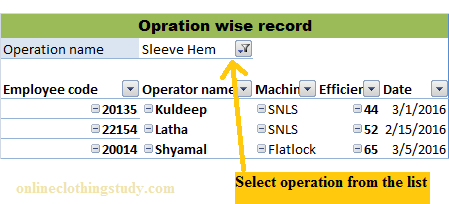 |
| Figure-3: Operation wise skill history |
Developing and maintaining a skill matrix is a time-consuming task. Still, you have developed it once, and update the same in weekly or monthly intervals would be very helpful. Real-time shop floor control systems have such a feature to record operator skill history automatically.
You might be using a different format for recording and viewing operator skills in your factory. However, do you like this method? If yes please write your feedback on the following comment box.



Leave a Reply