

In this article, I have explained how the monthly efficiency report of a sewing line is prepared. And how to calculate monthly efficiency report of a sewing floor.
To know the monthly efficiency calculation method, read follow steps.
Step 1: Efficiency calculation formula
There is a standard formula to calculate the efficiency of a line. The efficiency calculation method has been explained in another article, How to calculate the efficiency of a production line? Please refer to that article in case you need to know details. Otherwise, just follow the following formula.
Step 2: Prepare Monthly efficiency calculation table on spreadsheet (Excel Sheet)
To track monthly production data and manpower details create one table on excl sheet as following that includes information
- No. of operators (include helpers if manual SAM is added to your Operation Bulletin) working in the line
- Total working hours per day
- Total garment produced by the line at the end of the day and
- Standard Minutes (SAM) of the style that is produced by that line
Also add columns for date and styles for reference.
Add three more columns on right side of the table and add formula into the cells of those columns as following
- Total minutes available ( No. of operators X working hours per day X 60)
- Total standard minutes produced (Line output X Garment SAM)
- Efficiency% (Total standard minutes /Total available minutes) * 100
Add 31 rows in the table after table header. Add dates from 1st to 31st on the first (date) column.
 |
| Image-1: Monthly efficiency report (Blank sheet) |
Now your monthly efficiency calculation sheet is ready. See image-1: Blank efficiency report sheet.
Step 3: Data Capturing
At the end of each day fill this sheet date wise with actual information of manpower, working hours, production in pieces and garment SAM.
 |
| Image-2: Monthly efficiency report (Filled sheet) |
Step 4: Monthly efficiency of a line
In the row of monthly totals, you have whole month’s data of total minute produced and total minutes available to the line. On the efficiency column you will have monthly line efficiency.
Total minutes available : 751800
Total standard minutes produced : 202953
So, Monthly Efficiency this line is= 27 %
How to calculate floor efficiency?
Now if you have multiple lines in a floor and you to calculate average efficiency of the floor then use following steps.
Step 5: Calculate total minutes available to the floor
- Create same sheet for each line as shown in image-1.
- Fill data line wise. Sum line wise monthly available minutes to calculate total available minutes for a floor.
Step 6: Calculate total standard minutes produced by the floor
Sum up all line’s line wise standard minutes produced to calculate total standard minutes for the floor.
Step 7: Calculate floor efficiency
Finally, use the efficiency calculation formula to calculate sewing floor efficiency.
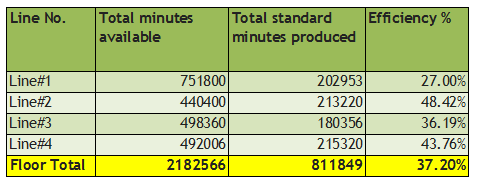 |
| Table: Floor efficiency |




Leave a Reply