

Here the objective is to prepare an efficiency report for a product line. It may be a daily efficiency report or a monthly efficiency report. It may be daily efficiency data for a month (See below image) for a specific line. The reporting format depends on your desired output data and you can design your report format as you wish.
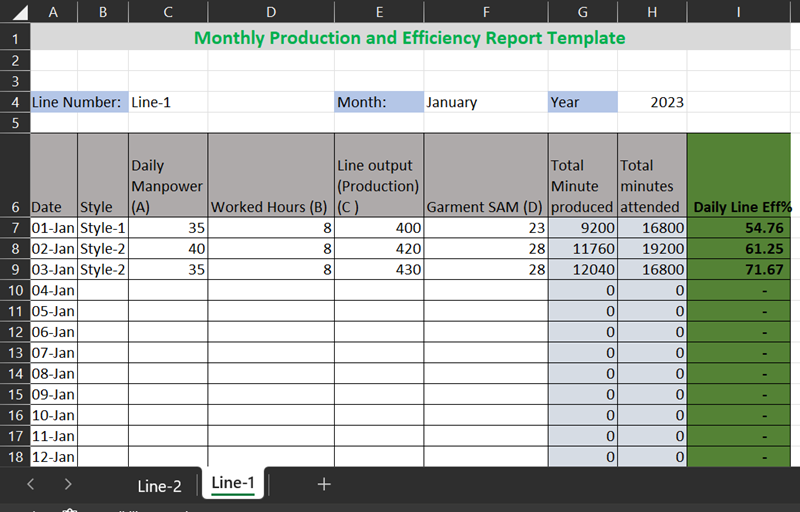
- Line output – number of pieces produced by the line
- Total manpower worked on the line.
- Total hours – You need to calculate the total hours (minutes) worked by all workers in that line.
- Garment SAM – SAM of the style you are making in that particular line
The efficiency calculation formula is shown here.
Line efficiency (%) = (SAM produced / Total minutes worked)x100
Where,
SAM produced = (Garment production x SAM)
Total minutes worked = (Total manpower x Shift hours x 60)
Learn how to calculate operator efficiency for a detailed efficiency calculation method.
In the Excel template as shown in the above image, I have added a formula for calculating SAM produced, total minutes worked, and efficiency on a particular day. You just need to fill in four pieces of information – marked A, B, C, and D on the report header cells. Efficiency data will be calculated automatically. The last three columns are protected so that the formula cannot be deleted by mistake.
This template is made for one production line. Copy this sheet and create a format in other sheets for other production lines. In a single file create multiple sheets for all your product lines. Click on the following button to download this file.
Save the file in the desired folder and use this format for preparing a production line efficiency report. For further help, you can reach us by writing mail.
Related posts:





Leave a Reply